 Circle stamp
Business Logo Stamp
Company seals
Create a custom stamp in the editor below. Change every word, border and symbol, then export a clean production file.
Plate size · Loading...
Templates
Circle stampCompany seals
 Rectangle stamp
Notary stamps
 Rectangle stamp
Stamp received
 Circle stamp
Library seal
 Circle stamp
Address stamp
 Circle stamp
Medical stamps
 Circle stamp
Wedding stamps
 Circle stamp
School stamp
Stamps by use
Start from a design made for the way the stamp will be used, then change every word, border and image.

Round seals with the registered company name on the ring.

Name, address and contact lines for invoices and letters.

Layouts for commission details; check the rules that apply to you.
Doctor and clinic details for prescriptions and forms.

Teacher feedback, school names and classroom marks.

Deposit, received and date lines for financial paperwork.

Names and dates for invitations, favours and envelopes.

Return addresses for envelopes and parcels.

Paid, received and approved dates for incoming documents.

Mark documents as received, with the date and a name.

Your logo inside a ring of text for packaging and cards.

Ownership marks for books and collections.
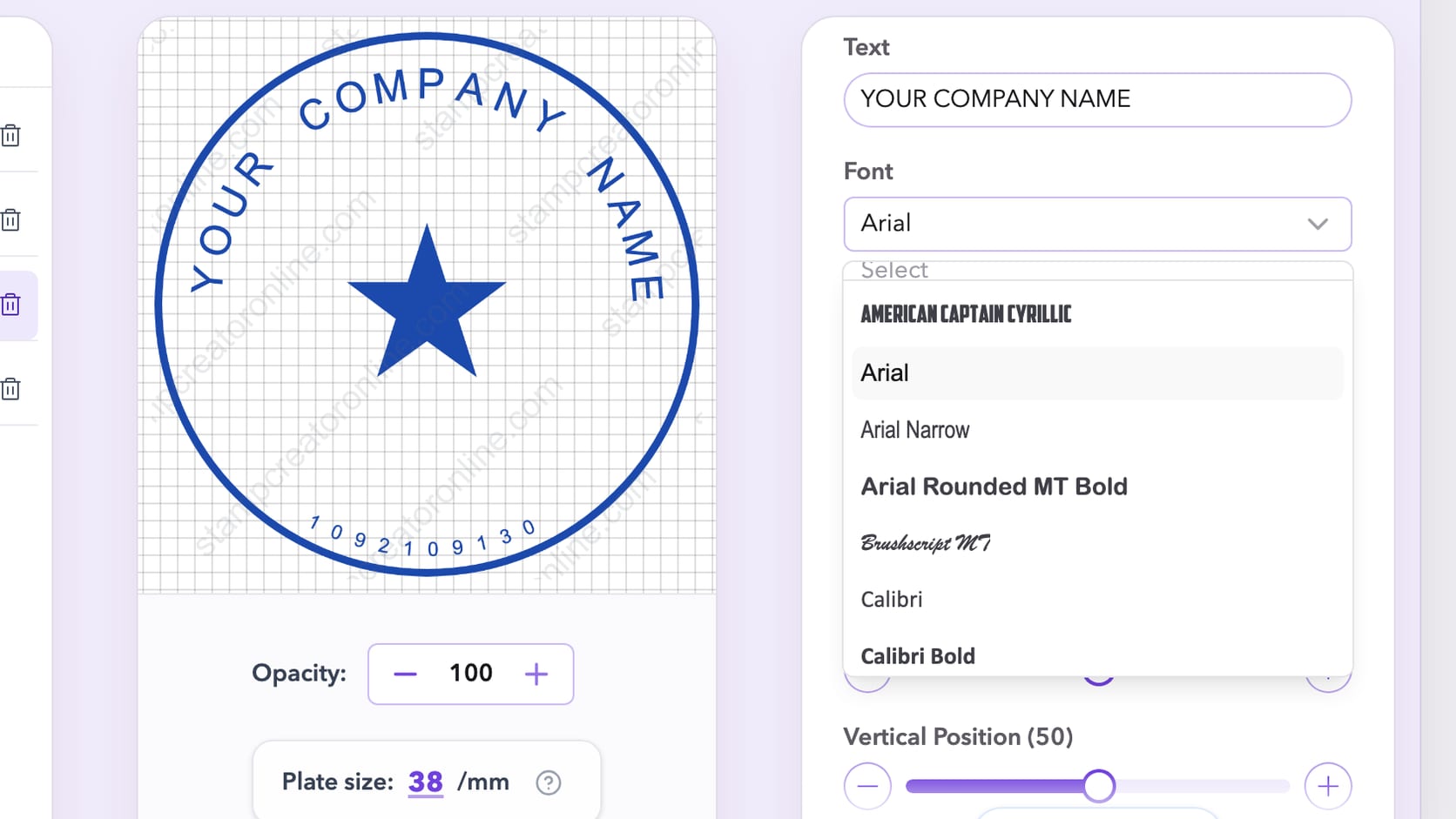
Start by selecting the shape of your stamp — circle, rectangle, triangle, or oval. Each shape supports different layout needs and looks.
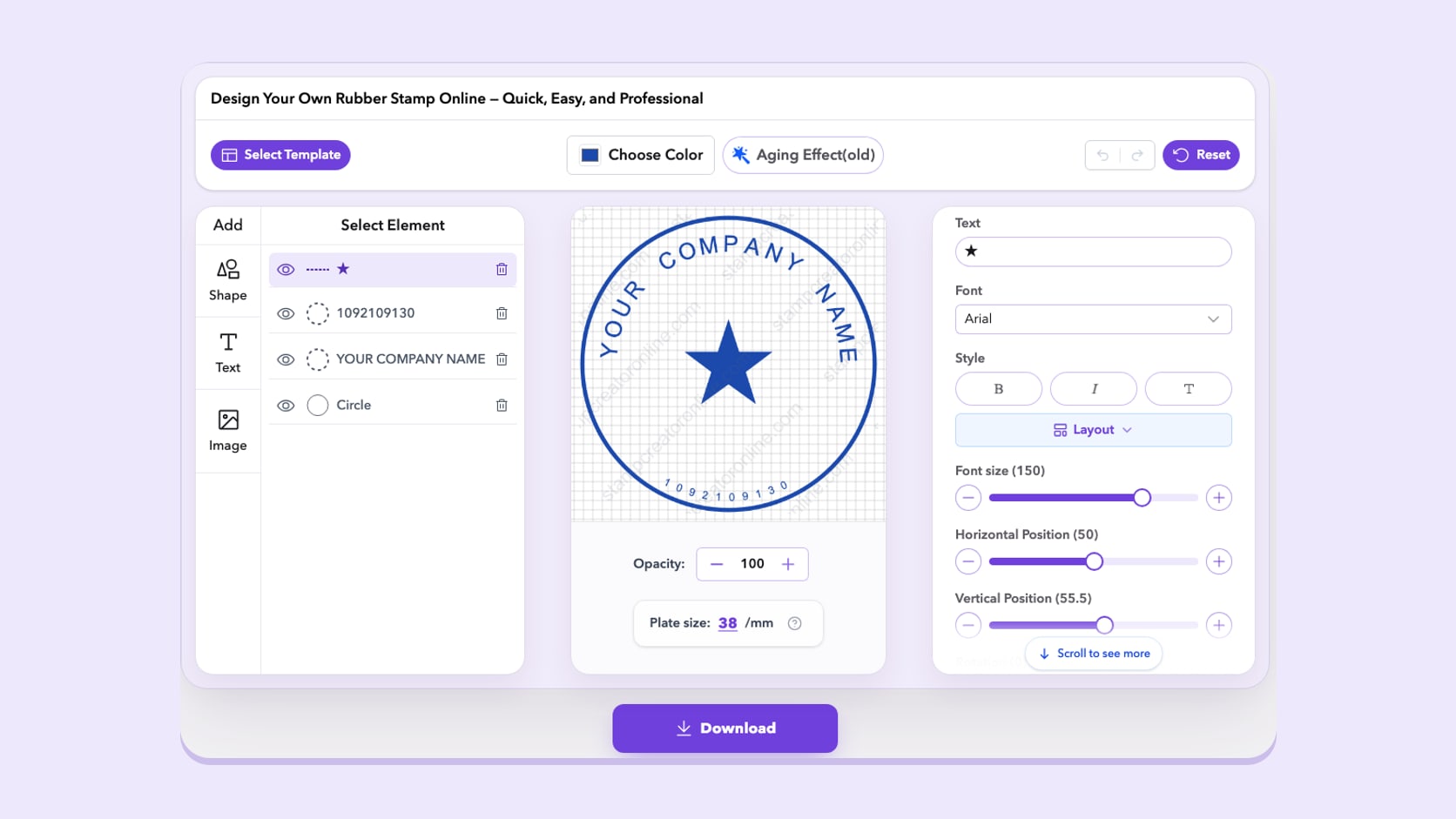
Enter your custom text. You can add text along the inner or outer frame, or place it in the center. All text elements can be resized, rotated, and aligned.
Download your stamp in multiple file formats — perfect for digital use or for production at a print shop.
Why make it online
Edit, preview and save as many versions as you like; you pay only for the file you download.
Text, borders and images stay separate, so changing an address is an edit, not a redraw.
Design on a laptop, tablet or phone in the browser, with nothing to install.
PNG for documents, SVG and EPS for manufacturers, and PDF and DOCX for paperwork.
Start from a template, replace the sample wording and download straight away.
One-time downloads from $2.50, or unlimited stamps on a monthly, yearly or lifetime plan.
Save and re-edit anytime in your browser
From digital use to stamp manufacturing, Stamp Creator Online gives you all the formats you need in one place.
Customer reviews
Office managers, shop owners, teachers and designers on what they made and how the files worked out.
average rating · 10 reviews
Finally a company seal that doesn't look like clip art
Our old seal was a blurry scan from years ago. I picked a round template, typed our registered name into the outer ring and swapped the star for our logo. The curved text took a couple of tries because our name is long, but the spacing controls sorted it. I bought the vector pack so our local printer could make the physical stamp from the SVG, and he said the file was clean. Best company seal maker I've tried, and I tried a few.
 Rachel OkaforPractice manager, dental clinic · Leeds, UK Verified purchase · Round company seal
 Marcus LindqvistCeramics shop owner · Gothenburg, Sweden
Packaging stamp done in about 20 minutes
I used it as an online stamp maker for my shop branding: logo in the middle, shop name around it, transparent PNG for my labels. Then I sent the same design to a rubber stamp place for the stamp I press on boxes. One tip: check your logo is high resolution before you upload it. Mine looked soft the first time, which was my fault, not the tool's.
Easy to replace every detail
Needed a rubber stamp style seal with our firm name, GST number and city for invoices. The India seal templates already had the right layout, so I only replaced the text. I liked that I could design everything first and pay only when the preview looked right. $2.50 for the PNG was fine for us.
 Daniel HerreraNotary public · San Antonio, Texas
Good layout tool, check your own state rules
I used the stamp generator to lay out my notary stamp before ordering the physical one. The rectangle template had room for my commission number and expiry date, which saved a lot of fiddling. One star off only because I had to confirm the exact wording with my state myself. The site is upfront that it doesn't do that part for you, which I appreciate.
 Sophie LaurentPrimary school teacher · Lyon, France
Three classroom stamps for less than a coffee
I made a 'Well done!', a 'Check again' and a date stamp for marking. Everything is editable, so I changed the font to something friendlier and put a little star in the middle. I played with it as a free stamp maker for ages before buying, since the preview costs nothing and you only pay for the download. My pupils love them.
 Amelia BrooksBookkeeper · Brisbane, Australia
A paid stamp for our invoice PDFs
Small thing, but it makes our workflow nicer: a red PAID stamp with the date that I drop onto invoice PDFs. The background is transparent, so it never covers the totals. Took five minutes in the online stamp maker.
 Grace MensahWedding planner · Accra, Ghana
The couple loved their monogram
I made a monogram stamp with the couple's initials and the date for envelopes and favour tags. We tried versions in the free stamp maker for a week until they were happy, then bought the PNG. Simple and pretty.
Pick a template or start from a blank design. Editing and previewing are free, and you pay only for the file you download.
Start designing freeA return address on an envelope, a company name on an invoice, a short “received” mark on a form: these are small designs with quite different jobs. Stamp Creator Online lets you build the artwork in your browser, starting with a template or an empty canvas. You can change the wording, border, symbol, size and ink colour while checking the whole stamp as you work.

Write down the full text before you choose a frame in the online stamp maker. A company name with a short location line often suits a round seal. A street address, telephone number and department name usually need the straighter lines of a rectangular stamp. For a quick document status, one or two large words can be enough. The amount of information matters more than the shape you happen to like in the sample.
Look at the longest line first. If a business name is twice as long as the example, it may need a wider text arc, a different font or a simpler centre. Shrinking every letter can make the design fit while leaving it unreadable at its final size. Compare editable stamp templates with similar amounts of text, and keep a little breathing room between the words and the border. The stamp generator guides compare round, square and rectangular layouts in more depth.
A company seal gives the business name a consistent place on letters, internal records and other paperwork. Start with the exact spelling your organisation uses, including punctuation and any legal suffix. Decide which secondary information belongs in the seal: a location, a registration line or a short department name. A full contact block can stay elsewhere on the page.
The centre can hold a logo, but it does not have to. A small symbol with open space around it often works better than a detailed logo squeezed between several lines. Review the design at the size it will appear on the document, especially the smallest lettering. Our company seal maker guides explain these layout choices, and the company seal templates give you balanced round layouts to start from. Where a seal has an official purpose, its wording and authorised use need to come from the relevant process; a purchased graphic does not establish that status.
An address stamp is useful when the same sender details appear on envelopes, parcel labels or forms. The address stamp templates already give each part of the address its own line; leave enough width for the postcode. Check the destination layout as well as the stamp: carrier labels, barcodes and delivery details need their own space. Optional information such as a website can be left out if it makes the stamp crowded.
For an office status, make the important word the easiest part to read. A “received” stamp may need a date or initials; a general message may need neither. Dates in these designs are editable text, so check and update them before making a new dated file. A saved image will not change automatically. Keep separate versions for different tasks so an old date or the wrong department does not find its way onto the next document. The online stamp maker tips cover more of these everyday office stamps.
The same design can become artwork for a manufacturer or a digital impression for a document, and those two uses need different checks. A worn effect can suit a digital mark, but the same gaps may be unwanted in a design intended for engraving. Save a clean version before experimenting with texture, and keep the lettering and border easy to distinguish. The rubber stamp templates are a clean place to start.
For a physical stamp, ask the maker for the finished dimensions, accepted file formats and minimum detail size. They can tell you whether thin lines, small letters or an uploaded logo need adjustment. Review their proof before production; a browser preview cannot reproduce every difference caused by ink, paper or the stamp material. This site supplies digital artwork. The physical stamp, ink and delivery are arranged separately with your chosen maker. Our rubber stamp creator guides walk through artwork preparation, first samples and two-colour designs.
A transparent PNG is a practical choice for placing a stamp on a document or a web page. It keeps the area around the artwork transparent, so the stamp does not arrive with a white rectangle. JPG uses a solid background. SVG and EPS are useful when the next step needs vector artwork; the complete package also includes PDF and DOCX for document workflows.
Check the contents as well as the file extension. A bitmap logo placed inside an SVG remains a bitmap, and enlarging it does not create extra detail. Keep the best original logo you have and inspect it alongside the text after export. Our guides to digital stamp files explain the differences in more detail. If someone else will receive the artwork, ask which format their application accepts before choosing a package.
A design can look balanced on the editor canvas and still be too large for an invoice or signature area. Place a copy in the actual document, set its intended size and read the smallest line without zooming in. Make sure the stamp does not cover a reference number, an amount or text that someone else needs to read. If the document will be photocopied, check a black-and-white copy too.
Before you pay, review every name, number and sample detail, not just the most prominent line. The free stamp maker guides explain what you can check before the paid download. Confirm the selected download package and the email address at checkout. Keep the editable design when you expect to change it later, and keep the exported master alongside any smaller document copies. That makes the next revision easier than trying to rebuild a stamp from a flattened image.
Ready to try your own wording? Open the online stamp maker, then compare PNG and SVG stamp downloads when the design is finished. Editing and previewing are free; downloading the final files is a separate purchase.
Stamp maker guides
Thin strokes break, script letters run together on a ring and small numbers fill in. How to choose and test a stamp font at real size before you download.
8 min read
Undo and redo, template pages that explain each layout, My Library for every signed-in account and corrected translations: everything that changed.
8 min read
The border can travel inside an SVG while the logo still depends on another file. Trace the missing resource before rebuilding a design that may be intact.
13 min read
Frequently Asked Questions — All About Creating Your Stamp Online
Support: Frequently Asked Questions
It means building the artwork in your browser. Choose a shape, replace the sample text, add a logo if needed and check the preview. The online stamp maker is free to use; downloading the finished files is a separate purchase.
Common uses include return addresses, book ownership marks, packaging and short notices on documents. A stamp image is a graphic, so its presence alone does not authenticate a document or replace a signature. The stamp maker guides cover these everyday uses in more detail.
Choose a layout, enter the wording and check the dimensions. For a physical rubber stamp, ask your manufacturer which file format and minimum line thickness they need before purchasing an export. Stamp Creator Online supplies digital files, not a manufactured stamp. Our rubber stamp creator guides explain the production checks.
Designing, editing and previewing are free. The finished file download is paid. Compare the PNG, vector and complete packages on the stamp download prices page; any applicable tax is shown at checkout.
Yes. Start with a company seal template, replace the sample name and registration details, then adjust the logo and border. Check the finished text at its intended size. The design tool does not determine the official status of a seal. The company seal maker guides cover wording and layout.
This service supplies digital artwork. The cost of manufacturing a physical stamp depends on your chosen maker, size, material and delivery options. Ask the manufacturer for a quote and artwork requirements before ordering.
Ask a local stamp maker or your preferred manufacturer about producing it. Confirm the dimensions, accepted file format and minimum detail size first. Requirements differ, so check before sending the artwork.
Choose a round stamp template and edit the curved text layers. Give the outer wording enough space inside the border, then adjust the centre text or symbol. Preview the result at its intended size before choosing a download.
Yes. Upload a supported image from the design panel and adjust it as a separate layer. A simple logo is easier to read at small sizes. A bitmap image remains a bitmap when placed inside an SVG stamp export.
Keep the design open in the editor while you revise it, or save it to My Library: any signed-in account can keep up to 50 designs, and monthly, yearly or lifetime plans keep up to 1,000. An exported PNG does not preserve separate text and border layers for later editing.
You can arrange the required text and symbols, but a template does not grant authority or establish legal compliance. Check the applicable requirements and permissions before using a design as an official seal.
Yes. The editor supports round, rectangular and triangular borders. Choose a shape that leaves enough room for the full wording instead of reducing every line to fit a small frame. The stamp generator guides compare these shapes.
The PNG package contains PNG. The vector package includes PNG, SVG and EPS. The complete package adds JPG, PDF and DOCX. EPS is prepared separately and becomes available when ready. Compare the current stamp download packages before choosing a format.
The preview in the editor shows a light Stamp Creator Online watermark so the design cannot be copied before purchase. Files you pay for, and every download on a monthly, yearly or lifetime plan, have no watermark. Designs saved to My Library on a free account show a watermarked preview.
Yes. The editor works in mobile browsers with a layout built for touch: the element buttons sit above the canvas, and colour, ink wear and opacity sit below it. You can download the finished file straight to your phone.
Use the undo and redo buttons above the canvas, or press Ctrl + Z (Cmd + Z on a Mac) to undo and Shift + Ctrl + Z or Ctrl + Y to redo. Your history is kept while the tab is open.
1x suits screens and email, 3x stays sharp in documents and when printed at stamp size, and 10x gives a large file for big prints or a manufacturer who asks for a high-resolution PNG.
EPS is a vector format that print shops, rubber stamp makers and design software such as Adobe Illustrator and CorelDRAW open directly. It comes with the vector and complete packages and is prepared separately, so it downloads when it is ready.
Insert the transparent PNG, set Wrap Text to In Front of Text and resize it to the real stamp size. Turn on the aged ink effect in the editor before you download if you want an uneven, pressed look.
Pick a template or start from a blank design. Editing and previewing are free, and you pay only for the file you download.
Start designing free